Mutation
QuickSR supports 4 mutation operators.
Subtree Mutation
This mutation strategy randomly selects a subtree in the expression. The selected subtree is then replaced by another randomly generated subtree. This allows for significant changes in the expression structure, potentially leading to new solutions.
The max_depth_increment parameter controls the maximum depth of the inserted subtree. This helps in controlling the complexity of the expressions and prevents excessive growth. Default is 3 if not provided.
The mutation_probability parameter determines the likelihood of applying the mutation to an individual. Default is 0.7 if not provided.
Usage:
mutation=SubtreeMutation(
    max_depth_increment=3,
    mutation_probability=0.7
)
An example of how subtree mutation is performed with max_depth_increment = 3:
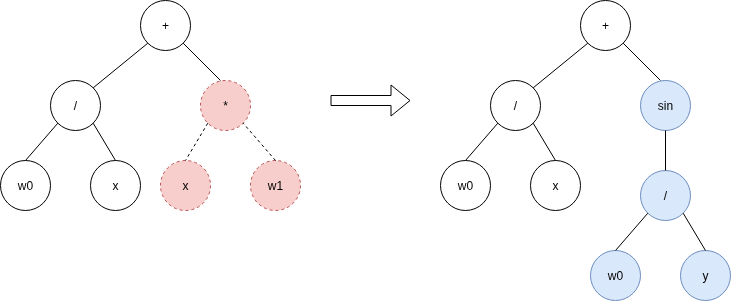
Note that the new subtree (shown in blue) could have had a depth less than three. Three is just an upper bound.
Hoist Mutation
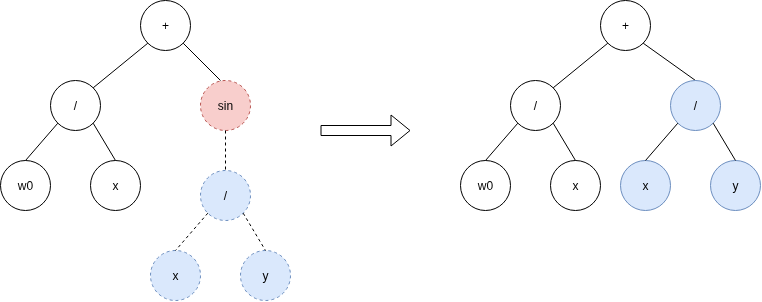
This mutation strategy randomly selects a subtree from the expression and replaces it with a randomly chosen, smaller subtree within that subtree. This can lead to expressions becoming more simple, fighting the bloat problem.
The mutation_probability parameter determines the likelihood of applying the mutation to an individual. Default is 0.7 if not provided.
mutation=HoistMutation(mutation_probability=0.7)
Point Mutation
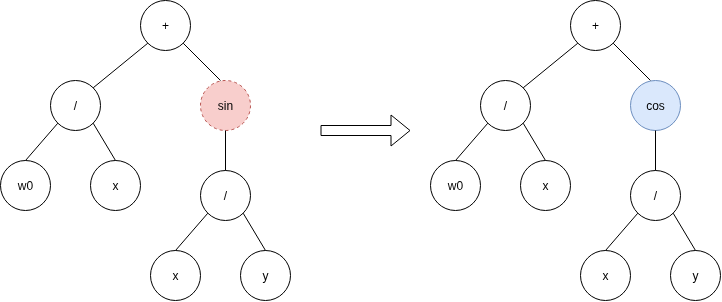
This mutation strategy randomly selects a node in the expression.
If the selected node is a terminal (constant, variable, parameter), it is replaced by another randomly generated terminal.
If the selected node is a unary operation (sin, cos, exp, relu), it is replaced by another randomly chosen unary operation, while its sole operand (child) is preserved.
If the selected node is a binary operation (+, -, *, /), it is replaced by another randomly selected binary operation, while both of its operands (children) are preserved.
This strategy explores new functions without growth in the complexity of the expressions.
The mutation_probability parameter determines the likelihood of applying the mutation to an individual. Default is 0.7 if not provided.
mutation=PointMutation(mutation_probability=0.7)
Distribution Mutation
This mutation strategy randomly applies one of several mutation strategies at every mutation operation according to the specified probabilities.
- Parameters
mutations List of mutation strategies to be applied.
probabilities List of probabilities corresponding to each mutation strategy.
mutation=DistributionMutation(
    [SubtreeMutation(), HoistMutation(), PointMutation()],
    [0.5, 0.25, 0.25]
)